Experience Design
The Complete Guide to Experience Design What is Experience Desing? Why is Experience Design Important? Benefits of Experience Design Testing What to Consider in Experience Design The Experience Design Process 7 Tips for Experience Design Experience Design Testing With Poll the People Conclusion Experience Design FAQs
The Complete Guide to Experience Design
Customer experiences are how the user perceives interactions with a company. They are a very important part of a successful business and the experiences should be useful, usable, and enjoyable for the consumer. In today’s highly competitive market experiences are becoming more and more important and a business that creates great experiences creates differentiation and are more likely to succeed. But in order to have great experience design, you need to think consumer first.
The consumer is at the heart of your business and your business wants to create experiences that create emotional responses to products, services, or the brand. It is a lot easier said than done to put the customer first and have good experience design, it should not be a guessing game and the design of your user experience should be optimized before you launch.
Poll the People offers a great platform for testing your experience design, giving you the best ways to meet your user’s needs. If you optimize experiences before launch you will be more likely to meet and exceed customer expectations, and create loyal customers. Your goal is to perfect the customer experience with products, services, websites, or anything else your customers interact with.
This page will give you an overview of experience design, benefits, tips, mistakes, and how to test experiences with Poll the People. We have a lot of great content on other topics including everything you can test with Poll the People and what is usability A/B testing.
What is Experience Design?
Experience design is an approach to creating experiences for people that solve a problem, generate emotional responses from the user, drive usage and customer behavior. Experience design pulls from user needs, feelings, emotions, and opinions to create great products, services, processes, environments, or strategies.
It is an approach to designing any experience, transactional purchases, customer support interactions, marketing messaging, or any other aspect of the business that the desired user interacts with. But more than just how people interact with the business experience design is a business strategy. Some of the best brands found success when they came to the market because they planned and tested their experiences. Companies like Airbnb had a huge impact almost immediately because they focused on user experience when they were in the development stage.
Experience design is not a “one and done” process, it involves a lot of iterations and multiple tests to find the best experience for your customers. The feedback from the end-user is what ultimately creates a disruptive and effective experience, you need to gather as much feedback as possible in order to make the best user experiences.
Companies use experience design in many different phases of the product, service, or business, but we suggest testing experience design before launching the concept to the market. Whatever stage you are using experience design starts and ends with the user in mind.
The user being the main focus of experience design means that a business needs to understand the audience thoroughly. The experience design process is an outside-in process that doesn’t focus solely on the business and products but on how the user interacts with them. It is a process that is used by some of the largest and most influential companies in the world and has caused some of the biggest market disruptions in recent memory.
Why is Experience Design Important?
Designing great experiences for your customers is more than making your product or service easy to use or enjoyable, it’s about influencing the way the business makes the user feel. Ease of use can be a way to make an experience good but it could also make the consumer feel insecure, if the experience is too easy the user might not feel safe or fully comfortable with the brand. Additionally, if you just focus on making the experience enjoyable you might hurt the usability of the product or service because a button is hidden behind a new graphic or image.
No matter how much you prioritize experience design or not your customers will have experiences with your services, product, or brand. Every social media post, page on your website, and point of interaction will elicit an emotion, what that emotion is, is mostly up to the business.
Great experience design means the business considered every step of the journey a customer takes in the process of taking the desired action. When a business begins to consider all of these points of interaction a much better product is created. All of these things need to be considered and strategically implemented to make an impact. From the colors and messaging of ads to the mobile app, every touchpoint is an opportunity to create loyal customers.
Experience design is so important because it creates more customers and great experiences will create customers that come back for more. When you no longer focus on just the product you are literally selling an experience.
Benefits of Experience Design Testing
1. Customer Acquisition
Customer acquisition is simply getting new customers. Your business needs to convince and persuade customers that the business’s offering is worth their hard-earned money. There are a lot of strategies to acquire new customers but one of the most successful ones is having great experience design.
A strong and valuable experience design offers a business a strong competitive advantage in gaining and retaining customers. The more user-friendly and intuitive the features are, the easier it is to build trust with the target audience. As we have seen great user experience can be more effective in attracting customers than price is.
2. Improves Customer Retention
As we talked about earlier great experiences can keep the user engaged and interested enough to be a repeat customer. Creating memorable experiences, useful products, empowering users with knowledge, and impactful services user experience design allows companies to gain more loyal customers. For example, if you have a website that offers the user information that will improve their life, make them more productive and successful the customers will view the business as a valuable part of their life. This feeling about the business will make them more likely to visit your website and buy more of your products before going to other brands or comparing products and services even if the competitors offer it for less.
3. Reduces Development Time and Cost
We all know a brand that is well designed and just works great, it’s easy to see what brands have products or services that are poorly designed and the ones that spent time and money to make sure the business worked from the start. Every consumer hates using a website or app that is glitchy, slow, crashes, or is just outdated. Similarly, websites and apps that have a confusing layout, are hard to read, or have a hard-to-understand color scheme will have a high bounce rate. These examples of poor user experience are exactly why businesses should focus on their customers.
A business that has a website, product, or service that doesn’t fill the user’s needs will either fail or have to go back to the drawing board to get it right. If you are one of the lucky businesses that have the resources to redesign, wouldn’t you rather spend that time and money gaining customers and revenue? Businesses that focus on making the user experience great from the start save themselves a lot of time and money in the long run. Everyone wants to get their great new idea to the market and show everyone what they have been working on, but if what your working on doesn’t work, you’re back to square one and wasted all the resources you already used.
4. Increased Insights From User Engagement
The insights a business gains through how and why a customer uses the product or service are extremely valuable. The consumer gives you information on what they find valuable and what pushes them to spend their money, you hope this is the experience they have. But, with experience design testing you will understand if the experience you are providing is good enough to attract and keep customers. By optimizing the user’s experience you can measure the success of that experience and shape the business around what works.
5. Reduce Troubleshooting and Support Costs
If the consumer doesn’t find issues with the product, service, or brand then there will be no need for long and complicated support calls of troubleshooting. A good portion of engineering budgets is spent on fixing issues that could have been avoided. Additionally, when a customer has an issue with the business they will often contact support, but with a well-thought-out experience design, the need for support is reduced. Making sure that the user experience design is efficient and effective from the beginning will help take the pressure off your engineering and support teams.
What to Consider in Experience Design
The experience design field is one in which designers and researchers seek to understand and analyze how people experience a business and what they experience in their environment. This is very different from the product design process, in which an object or device is designed for a specific purpose with certain functions and technical specs; when someone interacts with this product, it’s because it will do something. For example, pens are designed to allow users to write or draw on paper; iPods play music; cars drive us around.
Experience design is much different than creating a product for a purpose, to keep it simple, here are a few main things to keep in mind when creating and testing experience design.
Human-Centered Thinking
Experience design research is done best when focusing on human-centered thinking: instead of viewing people as simple consumers who purchase products that can be objectively evaluated based on pre-determined criteria (is it fast? does it fit into the design?), experience design research seeks to understand why people experience what they experience. What do they experience in their daily lives? How does this experience affect them?
Experience designers draw upon the techniques of ethnography, empathy, and observation to gather data about users’ experiences; these methods are very different from more traditional forms of market research, which tend to rely on surveys or focus groups (which may be ineffective for gaining insight into experience). Experience design recognizes that users’ experiences occur within larger contexts, like societal norms or economic status. In addition, experience design is not simply a process delineated by phases: it requires constant interaction between experience designers and those being designed for throughout the process. This often results in new product designs being changed based on insights gained during experience design testing. Finally, experience design is not solely a process that applies to physical products: it can be applied in the experience of services and intangible experiences as well.
Poll the People, unlike traditional market research platforms, allows you to get real insights from users on the usability, emotions, and experiences they associate with the business, product, or service. The best part is these valuable insights can be tested and analyzed in about an hour, Poll the People is less expensive and faster than other market research companies.
Design Experiences Not Features
In the past businesses would focus on the product over the consumer. Today we know that the consumer really determines how successful a business will be. This is why designing experiences, not features or products changes the entire business. Things that used to be simple and quick will receive more attention, decisions that were once on marketing become a business-wide discussion. Today the most profitable businesses are centered around the experiences that their users have with the business. Everything from the colors, logo, the amount of tabs on the homepage of the website, and every other element is analyzed with the consumer in mind.
For example in the past the goal of the marketing department would be to get more orders, today the goal would decrease the amount of clicks a customer has to go through to buy our product because they found that steps to purchase was the main pain point. This new goal focuses solely on how the user interacts with the business instead of just seeing them as a number. The new goal also involves more departments to create that experience, the marketing department would have to communicate with the design and development teams in order to achieve this goal. This would keep all parties on the same page and help to create a better overall business, that cares about their consumer.
The most important thing is that consumers don’t know and really don’t care about the structure of your business or culture. The thing they do care about is how they use your products, how you interact with them, and how everything your business does will help them or fix a pain point. The consumer ultimately cares about themselves, so why not care about them too? No matter what culture you create or how you structure the business, that culture and structure will be reflected in the experience design. Keeping the business focused on experiences will help to create a mutually beneficial situation for the business and customer.
Choose the Right Technology
The design and ideation of your experiences are extremely important, keeping the user in mind will get you to a good spot. But, the foundation of that idea or the technology that powers the experience is just as important. Your design can be the best anyone has ever seen but if the consumer cannot use it there is no point. The workflows, navigation menus, filters, and other elements of your business that are interacted with impact the experience, but the technology that runs those things is the other half of the equation.
The system, technology, or mechanism that go into creating a great experience design are the second half of the equation:
Will the website and its widgets be fast and effective? If the foundation (technology) is slow the user will probably find a site that isn’t.
Will you be able to implement the design as it’s supposed to be? You most likely spent a lot of time and effort into creating your design, your technology needs to be able to do exactly what you want it to do.
Is it flexible? The market is always changing and so are the users. They want their needs met fast, if the design can’t be updated and changed quickly your customers will go somewhere else.
Do you have the tools to understand your users? Using human-centered thinking means you need to know the user, and that requires tools. Poll the People is a great platform for understanding the user, the platform utilizes a dedicated panel of users that will answer your questions to help you achieve your goals. The platform is also less expensive and faster than most traditional user research platforms.
The biggest thing to understand is that experiences are created through both design and technology. When they aren’t in sync the experiences either don’t work as intended or aren’t made with the consumer in mind.
Test and Use The Data
Creating a successful experience design means you need to understand the user and gather data that helps your business create that experience. This means that one of the most valuable things in the entire process is the feedback, insights, and data that you receive. It might sound contradictory to say that you need data to make human-centered experiences but they go hand in hand. The data that is gathered needs to be from your users and it needs to be their emotions, needs, opinions, and wants.
Creating experiences that accomplish goals is hard, each experience has to be user-centered and help the business. This is done through testing and iterating your designs. Understanding your audience and what they want will help you create the best experience design possible. the results from asking your users what designs, features, or aspects of the experience they like the most allows you to confirm assumptions and take action.
Once you know what kind of experience you want to create you can break it down into its many parts and pieces. Then test every aspect of it, asking your audience for their feedback to later optimize those parts of the experience. We suggest testing everything from colors to images to messaging, these and so many other elements of the experience and business as a whole are testable and might affect how the user experiences your business.
If you test every aspect of your experience design and optimize based on the data you save time, effort, and have a higher chance that your business will succeed. The test won’t tell you everything you need to know but the right data can help you make the right decisions and give you the confidence that it will work.
The Experience Design Process
The experience design process is somewhat new to the business world and might be slightly different than if you are designing a product or service. Either way, you must apply design thinking and an agile business model to successfully test your experience design and create the best business for your users. Both of these processes are focused on the user and are non-linear, meaning they have a human-centered approach and use fast prototyping to finally achieve the goal. If you’re looking for a one size fits all solution to experience design, there isn’t one. But with the right tools and following the process you will create your ideal experience in no time.
Design Thinking
Design thinking put simply is finding the right problem to solve before looking for solutions. A lot of times in business we want to solve a problem even if we don’t fully understand what that problem is. We jump right into solutions before understanding why it needs to be solved. This method allows you to create the right thing to solve the right problem in the right way. Design thinking is a relatively new way to look at decision-making, but it is one of the best ways to ensure the solution will work.
The design thinking process is done in five phases:
1. Empathize
This first phase is where you consider the consumer. This stage is why design thinking works so well in experience design, by definition you are focusing on the user. Empathizing with the user helps to give you a full picture of the problem and why it is a problem.
2. Define
The second stage is pretty clear, you need to define the problem. You might think you have a good idea of what the problem is before the empathize phase but getting insights from the user will help you define the pain point in detail. This stage requires you to put together the information you gathered previously to create a clear issue that needs to be solved.
3. Ideate
Ideation is a big part of the experience design testing process, once you understand what the problem is you need to think of all of the different ways the issue might be solved. So far you have taken the steps to understand your users and their issue, this stage is where most other people start. But, you have an advantage in knowing exactly what the problem is from the user. There are many different methods to ideation including brainstorming, whatever technique you decide to use make sure to come up with as many solutions as possible and sift through ideas to find a few of the best ones.
4. Prototype
This is where testing and creation come into play. Once you have followed the previous steps you need to put the info you gathered into action. You picked a few of the best ideas for solving the problem, so create them. This is where the marketing team interacts with the design team to create many inexpensive, small, or simple versions of the experience to help you understand what works best in the next step. Building these prototypes will help you understand if it is possible to create a great experience with that specific idea. By the end of this stage you will understand constraints, roadblocks, and have an understanding of how real people might experience the solution you came up with.
5. Test
Testing is the most important part of the process and Poll the People (Usability Testing) is our favorite tool. This is where you take your prototypes and interact with your users again. You present them with the new experience design that solves their problem and ask them to give you feedback. The feedback will help you understand if it achieves the goal, if the experience is worth it and valuable to the consumer. Most of the time the first test won’t give you the final version of your experience, you will need to continue to make changes based on the data and optimize repeatedly.
Experience design is a process that takes a lot of planning, research and requires an in-depth understanding of your target audience. Luckily, there are plenty of tools and platforms that help with every step of the process. Today it is much easier to complete the experience design process and collect the data you need to find out what your users want the most. Poll the People’s usability testing platform allows users to create, run, and analyze a test in under an hour, making the iteration process so much easier. The platform also offers much lower prices than traditional testing programs.
6 Tips for Experience Design
As you know by now experience design is an important thing to consider when creating a business and can lead to a lot of success. We want to reinforce some points and give you some new tips for engineering a great experience design.
1. Don't Reinvent the Wheel
While we have mentioned that your business should focus on the user and their needs, your business was created for a purpose. You have a product or service, you need to understand if that product or service is fixing an issue, but if the issue does not align with the business there is no point. The groups, people, departments that are handling the experience design need to make sure they understand the goals and strategy of the business as well as the opinions and needs of the customer.
In the past design and business were two extremely different fields, but with experience design emerging as an important factor for success, the two are merging. As the people creating experience design you need to understand the priorities of the business. For example, if the simple example is to get more orders, the design would be about the experience that drives more orders through interactions with the website, product, or overall business. If you focus too much on one of the other you might fall into a full overhaul of the business goals or the experience when neither is needed.
Understand what you do well and then try to improve it through creating a great experience for customers, you do not need to change every aspect of your business but every aspect of your business should be considered.
2. Keep it Simple
No one likes when a website makes you go through a ton of steps to get where you want to go or when a product is just too complicated to figure out. The businesses that aren’t simple and user-friendly rarely succeed, you want your user to be able to figure out what you do and how to use the business without any help. The process for buying a product or taking a desired action shouldn’t take very long and should be straightforward. You and the people that work for your business understand the product or service much better than someone that has never seen it, so keep the experiences simple enough that a first-time user can figure it out in minutes.
3. Understand the Needs and Wants
A lot of what we have talked about has been the user and that is because the experience they have is the most important thing. We have talked a lot about understanding the user, but it is worth reinforcing. Before you roll out any experience design you need to have a clear and full understanding of what your target market needs and wants out of your business.
4. Make it Easy to Navigate
Keeping the experience design simple is important and navigation goes a long way in creating effective experiences. When you design the website for example you need to make different things stand out. Put the most important information at the top of the page. Users often don’t want to spend a lot of time trying to understand what they are supposed to be reading. Make sure the most relevant and important information is right there when they open your page.
Having clear and handy navigation tools, an engaged user will want to explore your website and to make it easy, have all of the navigation tools readily available. Having things like different sections of your website, the locations of various content, as well as links to your social media or other valuable pages will help give your users a full experience. Additionally, adding sections like “you might also like” or “for you” based on the content they have interacted with might help keep them on your page longer.
5. The Call Action Buttons Need to Stand Out.
Let’s face it your business wants customers to buy the product, sign up for the service, and really just convert to make you money. If it is not clear where they can do that they are less likely to convert. Your CTA’s need to be obvious and impossible to miss. They also need to be appealing and tell the user exactly what they are going to get. For example “Sign Up Free” or “Check Out Here” are good examples of CTA’s that tell the user exactly what they are going to get.
6. Think About the Flow
The way the user interacts through the entire purchasing process is really what will define their interaction. If the entire flow of singing up, purchasing, or schedule is easy seamless, and fast they are most likely to have a good experience and come back. Changing between pages, sites, content needs to be seamless and easy. Think through what the user will do step by step to get a good idea of how the experience design should be set up.
Experience Design Testing With Poll the People
As we’ve hinted at before Poll the People is a great platform to test all aspects of the experience you are creating for your business. With a user panel of hundreds or thousands, you are able to decide how many users will give you confidence in a design. The templates provided make it easy to insert the versions of your design you want to test and immediately launch the test to the user panel. Unlike most traditional testing platforms Poll the People doesn’t make you wait days or weeks to get results, but most tests are complete in under an hour. With all of these benefits, most people would think it would be attached to a premium price tag, it’s actually the opposite. Poll the People wants to help as many people achieve their business goals as possible, that is why they are less expensive than other testing platforms and give you in-depth results dashboards to use the insights the users gave you.

1. What Can You Test With Poll the People
Your audience is defined, the problems are in sight, and ideas are flourishing everywhere. Poll the People now allows you to test a number of different parts of your business, take a look at our example test page for specific examples. Here are some of the common resources that users test on our platform.
Logo Testing
A logo is one of the most visible aspects of your company and will have a significant impact on your brand reputation. It’s critical to make sure your logo accurately represents your business and that your audience understands what the company offers. Testing your logo is a great way to validate a design and understand if it is effective. After that, you will be able to easily identify which logo design grabs the audience’s attention and creates a great initial interaction with your business.
Brand Messaging
One of the first things your customers will see is the message connected with your brand name and design; it must demonstrate relevance and assist them in understanding the value your business brings to the user. The goal of brand messaging is to communicate the value of your company and set the groundwork for the experiences they will have moving forward. Poll the People allows you to confidently and safely choose the best brand messaging, knowing that your primary audience will like the messaging too.
Advertisement Testing
If you’re a decision-maker, you’re well aware that advertising can cost a lot of money, and that number is only increasing. Usability testing ads allows you to make data-backed decisions based on the feedback you receive; user feedback may provide you with new ways to give users what they are looking for in your ads. It helps you understand what types of ads your audience will respond to and eliminates the risk of spending time and resources on ads that aren’t going to convert. This provides you the assurance that you’re using the correct digital ads – even before the launch.
Take a look at this example test to understand digital ad testing with Poll the People. This example looks at testing Google ads headlines to convert the most users.
Content Testing
Content needs to be seamless and fit with the experience that you want to create for the users. Every organization with a content strategy has a specific objective in mind for the material they produce; it could be sales, sign-ups, or other engagements, however, the effective way to accomplish those objectives is to understand what the audience is looking for. The best content is carefully studied to deliver exactly what the audience will respond to and interact with. It aids in the creation of the best experience possible for the user by providing them with guides, tips, and tools that will improve their interactions and keep them coming back.
We have a great example for testing different article titles to engage the most users. The example will show you how to test content on the platform.
Product Testing
The product your business presents to the user is an important step in the user journey. You want to make their experiences with your product just as good as the ones they have with your ads, website, or other content. The product will have a big influence on the user’s final opinion of your business. Testing things like packaging, usability of the product, and different features. This testing method can help increase revenue and improve customer retention.
Pricing Strategy
Your price influences how customers perceive the business in the marketplace and how they perceive your goods or service. One of the most crucial decisions you’ll make as a business owner is choosing the correct pricing strategy, it can have a big impact on how the audience thinks of the business.
These examples are some of the things that can have an impact on your experience design however, there are many other elements of your design that can and should be tested. Poll the People allows you to test just about any part of your business to create the best user journey before you launch the business.
2. How To Set up a Experience Test
Define Testing Objectives – Clearly outline the goals of the test, understand what you want to get out of the test. You need to have goals in order to measure the success of the experience test.
Choose a Template With Poll the People – the platform offers a number of templates that allow you to test just about anything. Poll the People has templates for logos, images, messaging, videos, websites, and anything else that goes into experience design.
Create Different Variations – Usability testing requires two variations that will be tested against each other in order to find the best option. Have two versions of the resource you are testing in order to gain insights and optimize the user experience.
3. Statistical Significance in Experience Design Testing
An experience design test is only useful if it gains statistical significance. This means that you need to have enough feedback to feel confident in the winner of the test. Poll the People makes it easy to set the number of respondents for a test with a dedicated user panel that will quickly provide a choice and feedback on why they chose it.
For most tests about 100 responses is good enough to create statistical significance, this will give you enough feedback to present the findings confidently to decision-makers. If you need more confidence and less margin of error, simply increase the number of respondents. If you are on a budget you can choose a smaller number and receive feedback even faster. But, luckily most usability tests with Poll the People can be created, launched, and analyzed in less than an hour.

4. Analyzing Test Results
Once you have created, launched, and received your feedback you’re ready to dive into the results. Poll the People provides an easy-to-digest dashboard that gives you the winner with charts and graphs to understand the margin of victory.
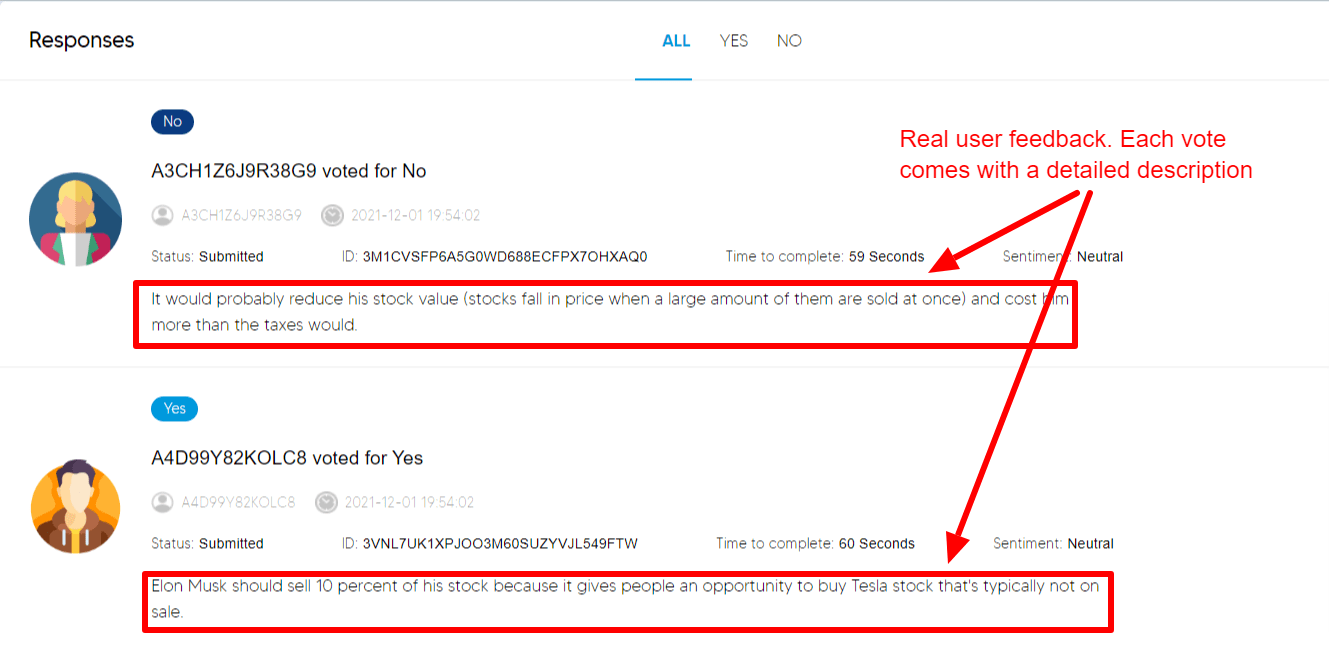
You will also be able to filter the users that chose version A from those that chose version B and analyze their responses as to why. This will let you understand what was liked about the version and what wasn’t. This feedback is valuable because some of the negative feedback might give you improvements that only your audience can give you. The positive feedback will allow you to continue to make the best business decision possible.
5. Making Changes and Creating Great Experiences
To this point, you have taken all of the steps to test your resources and find the version that the users prefer with the explanations as to why. Now it’s time to use that feedback and optimize your business. All of the insights and opinions that have been gathered give your business opportunities to create great experience design. Use the data you gathered to create a user journey that will attract and retain as many users as possible.
Conclusion
After reading through this ultimate guide to creating effective experience design you have the information you need to optimize your business. Follow all of the tips and processes we’ve explained to help your business be successful. Keep in mind experience testing isn’t a one-time solution, you may need to test some elements multiple times to find the best version and improve user experience. There are also some challenges that come with creating effective experience design, make sure to carefully plan and execute your tests and design to get the most out of the time and money you spend.
If you are focused on optimization and use the information that you now have, experience design testing can be a great tool to increase leads, customers, and revenue. Poll the People’s platform allows users to easily create, run, and test their business in under an hour, not days or weeks like traditional testing platforms. Additionally, Poll the People is much less expensive than other testing platforms, 100 users can give your business feedback for under $50.
If you found our guide useful feel free to spread the word and help other businesses create great experiences for their users before going live. Check out some of our other content on usability A/B testing or concept testing. If you are ready to use our platform and optimize your business sign up and start testing today.
Experience Design FAQs
What is Experience Design?
Experience design is an approach to creating experiences for people that solve a problem, generate emotional responses from the user, drive usage and customer behavior. Experience design pulls from user needs, feelings, emotions, and opinions to create great products, services, processes, environments, or strategies.
Why is User Experience Important?
User experience tries to fill the user’s needs if the user finds that they enjoy time spent with a business they are more likely to suggest that business to others and before life long customers.
What is Design Thinking
Design thinking is a process of trying to find the right or most impactful problem to solve before trying to find solutions. It is a process that helps decision-makers create the best solution by considering every aspect of the problem.
How Long Does a Test Take?
Poll the People’s tests typically take under an hour, depending on the number of respondents required and the segmentation applied to the test.